

2025 Reliable Study Materials & Testing Engine for NSE5_FSM-6.3 Exam Success!
Validate your Skills with Updated NSE5_FSM-6.3 Exam Questions & Answers and Test Engine
Fortinet NSE5_FSM-6.3 exam is a certification exam designed for IT professionals who are interested in demonstrating their knowledge and skills in deploying, configuring, and managing Fortinet FortiSIEM 6.3. Fortinet NSE 5 - FortiSIEM 6.3 certification exam is the only way to become a Fortinet NSE 5 - FortiSIEM 6.3 certified professional, which is a highly respected and recognized certification in the IT industry.
NEW QUESTION # 10
Refer to the exhibit.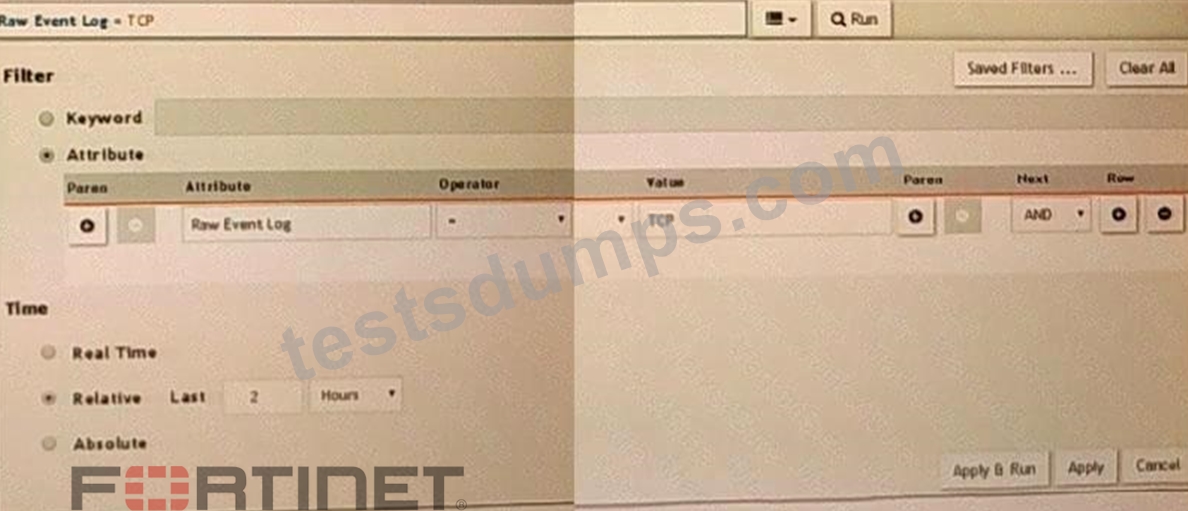
A FortiSIEM is continuously receiving syslog events from a FortiGate firewall The FortiSlfcM administrator is trying to search the raw event logs for the last two hours that contain the keyword tcp . However, the administrator is getting no results from the search.
Based on the selected filters shown in the exhibit, why are there no search results?
- A. The keyword is case sensitive Instead of typing TCP in the Value field. the administrator should type tcp.
- B. The administrator selected AND in the Next drop-down list. This is the wrong boolean operator.
- C. The administrator selected - in the Operator column That a the wrong operator.
- D. In the Time section, the administrator selected the Relative Last option, and in the drop-down lists, selected 2 and Hours as the lime period The time period should be 24 hours.
Answer: A
Explanation:
Case Sensitivity in Searches: In FortiSIEM, search queries, including those for raw event logs, are case sensitive. This means that keywords must be entered exactly as they appear in the logs.
Keyword Mismatch: The exhibit shows the keyword "TCP" in the Value field. If the actual events use "tcp" (lowercase), the search will return no results because of the case mismatch.
Correct Keyword: To match the keyword correctly, the administrator should enter "tcp" in the Value field.
References: FortiSIEM 6.3 User Guide, Search and Filtering section, which discusses the importance of case sensitivity in search queries.
NEW QUESTION # 11
In the rules engine, which condition instructs FortiSIEM to summarize and count the matching evaluated data?
- A. Aggregation
- B. Time Window
- C. Filters
- D. Group By
Answer: A
Explanation:
Rules Engine in FortiSIEM: The rules engine evaluates incoming events based on defined conditions to detect incidents and anomalies.
Aggregation Condition: The aggregation condition instructs FortiSIEM to summarize and count the matching evaluated data.
* Function: Aggregation is used to group events based on specified criteria and then perform operations such as counting the number of occurrences within a defined time window.
Purpose: This allows for the detection of patterns and anomalies, such as a high number of failed login attempts within a short period.
References: FortiSIEM 6.3 User Guide, Rules Engine section, which explains how aggregation is used to summarize and count matching data.
NEW QUESTION # 12
Refer to the exhibits.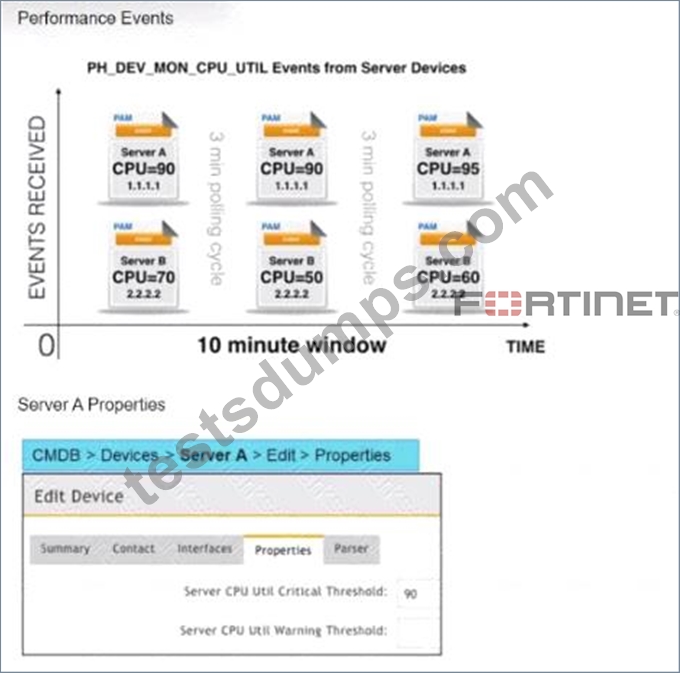
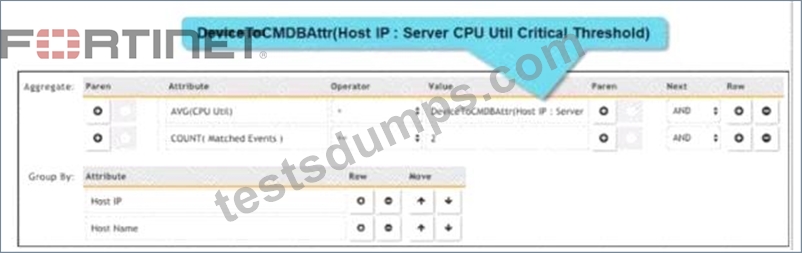
Three events are collected over a 10-minute time period from two servers: Server A and Server B.
Based on thesettings tor the rule subpattern. how many incidents will the servers generate?
- A. Server A will not generate any incidents and Server B will not generate any incidents.
- B. Server B will generate one incident and Server A will not generate any incidents.
- C. Server A will generate one incident and Server B will not generate any incidents.
- D. Server A will generate one incident and Server B will generate one incident.
Answer: C
Explanation:
Event Collection Overview: The exhibits show three events collected over a 10-minute period from two servers, Server A and Server B.
Rule Subpattern Settings: The rule subpattern specifies two conditions:
* AVG(CPU Util) > DeviceToCMDBAttr(Host IP : Server CPU Util Critical Threshold): This checks if the average CPU utilization exceeds the critical threshold defined for each server.
* COUNT(Matched Events) >= 2: This requires at least two matching events within the specified period.
Server A Analysis:
* Events: Three events (CPU=90, CPU=90, CPU=95).
* Average CPU Utilization: (90+90+95)/3 = 91.67, which exceeds the critical threshold of 90.
* Matched Events Count: 3, which meets the condition of being greater than or equal to 2.
* Incident Generation: Server A meets both conditions, so it generates one incident.
Server B Analysis:
* Events: Three events (CPU=70, CPU=50, CPU=60).
* Average CPU Utilization: (70+50+60)/3 = 60, which does not exceed the critical threshold of 90.
* Matched Events Count: 3, but since the average CPU utilization condition is not met, no incident is generated.
Conclusion: Based on the rule subpattern, Server A will generate one incident, and Server B will not generate any incidents.
References: FortiSIEM 6.3 User Guide, Event Correlation Rules and Incident Management sections, which explain how incidents are generated based on rule subpatterns and event conditions.
NEW QUESTION # 13
What does the Frequency field determine on a rule?
- A. How often the rule will trigger.
- B. How often the rulewill evaluate the subpattern.
- C. How often the rule will take a clear action.
- D. How often the rule will trigger for the same condition.
Answer: B
Explanation:
Rule Evaluation in FortiSIEM: Rules in FortiSIEM are evaluated periodically to check if the defined conditions or subpatterns are met.
Frequency Field: The Frequency field in a rule determines the interval at which the rule's subpattern will be evaluated.
* Evaluation Interval: This defines how often the system will check the incoming events against the rule's subpattern to determine if an incident should be triggered.
* Impact on Performance: Setting an appropriate frequency is crucial to balance between timely detection of incidents and system performance.
Examples:
* If the Frequency is set to 5 minutes, the rule will evaluate the subpattern every 5 minutes.
* This means that every 5 minutes, the system will check if the conditions defined in the subpattern are met by the incoming events.
References: FortiSIEM 6.3 User Guide, Rules and Incidents section, which explains the Frequency field and how it impacts the evaluation of subpatterns in rules.
NEW QUESTION # 14
Refer to the exhibit.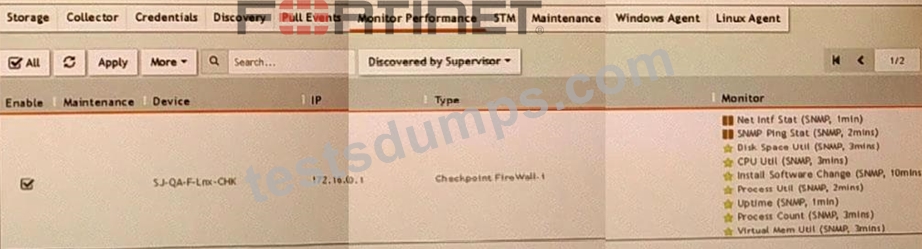
What do the yellow stars listed in the Monitor column indicate?
- A. A yellow star indicates that a metric was not applied during discovery and, therefore, FortiSEIM was unable to collect data.
- B. A yellow star indicates that a metric was applied during discovery, but data collection has not started
- C. A yellow star indicates that a metric was applied during discovery, and data has been collected successfully
- D. A yellow star indicates that a metric was applied during discovery, but FortiSIEM is unable to collect data.
Answer: C
Explanation:
Monitor Column Indicators: In FortiSIEM, the Monitor column displays the status of various metrics applied during the discovery process.
Yellow Star Meaning: A yellow star next to a metric indicates that the metric was successfully applied during discovery and data has been collected for that metric.
Successful Data Collection: This visual indicator helps administrators quickly identify which metrics are active and have data available for analysis.
References: FortiSIEM 6.3 User Guide, Device Monitoring section, which explains the significance of different icons and indicators in the Monitor column.
NEW QUESTION # 15
Refer to the exhibit.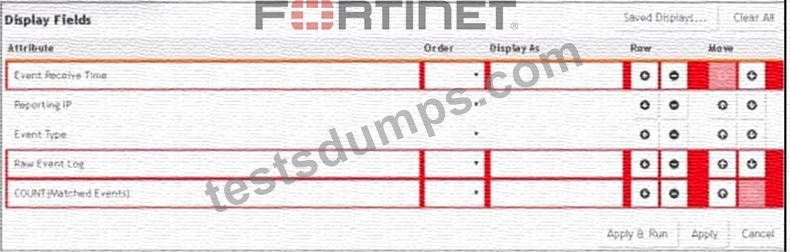
A FortiSIEM administrator wants to group some attributes for a report, but is not able to do so successfully.
As shown in the exhibit, why are some of the fields highlighted in red?
- A. The Event Receive Time attribute is not available for logs.
- B. The attribute COUNT(Matched events) is an invalid expression.
- C. Unique attributes cannot be grouped.
- D. No RAW Event Log attribute is available for devices.
Answer: C
Explanation:
Grouping Attributes in Reports: When creating reports in FortiSIEM, certain attributes can be grouped to summarize and organize the data.
Unique Attributes: Attributes that are unique for each event cannot be grouped because they do not provide a meaningful aggregation or summary.
Red Highlighting Explanation: The red highlighting in the exhibit indicates attributes that cannot be grouped together due to their unique nature. These unique attributes includeEvent Receive Time,Reporting IP,Event Type,Raw Event Log, andCOUNT(Matched Events).
Attribute Characteristics:
* Event Receive Timeis unique for each event.
* Reporting IPandEvent Typecan vary greatly, making grouping them impractical in this context.
* Raw Event Logrepresents the unprocessed log data, which is also unique.
* COUNT(Matched Events)is a calculated field, not suitable for grouping.
References: FortiSIEM 6.3 User Guide, Reporting section, explains the constraints on grouping attributes in reports.
NEW QUESTION # 16
Which FortiSIEM feature must you use to produce a report on which FortiGate devices in your environment are running which firmware version?
- A. Run a CMDB report
- B. Run a query using the Inventory tab.
- C. Run an analytic search.
- D. Run a baseline report.
Answer: B
NEW QUESTION # 17
An administrator defines SMTP as a critical process on a Linux server.
If the SMTP process is stopped, FortiSIEM would generate a critical event with which event type?
- A. Postfix-Mail-Slop
- B. PH_DEV_MON_PROC_STOP
- C. Generic SMTP Process Exit
- D. PH_DEV_MON_SMTP_STOP
Answer: B
NEW QUESTION # 18
Device discovery information is stored in which database?
- A. CMDB
- B. Event D8
- C. Profile D8
- D. SVN DB
Answer: A
NEW QUESTION # 19
Which two FortiSIEM components work together to provide real-time event correlation?
- A. Worker and collector
- B. Collector and Windows agent
- C. Supervisor and collector
- D. Supervisor and worker
Answer: D
NEW QUESTION # 20
FortiSIEM is deployed in disaster recovery mode.
When disaster strikes, which two tasks must you perform manually to achieve a successful disaster recovery operation? (Choose two.)
- A. Change the configuration for shared storage NFS configured for EventDB to the secondary FortiSIEM.
- B. Change the DNS configuration to ensure that users, devices, and collectors log in to the secondary FortiSIEM.
- C. Promote the secondary workers to the primary rotes using the phSecworker2priworker command.
- D. Promote the secondary supervisor to the primary role using the phSecondary2primary command.
Answer: B,C
Explanation:
Disaster Recovery Mode: FortiSIEM's disaster recovery (DR) mode ensures that there is a backup system ready to take over in case the primary system fails.
Manual Tasks for DR Operation: In the event of a disaster, certain tasks must be performed manually to ensure a smooth transition to the secondary system.
Promoting the Secondary Supervisor:
* Use the commandphSecondary2primaryto promote the secondary supervisor to the primary role. This command reconfigures the secondary supervisor to take over as the primary supervisor, ensuring continuity in management and coordination.
Changing DNS Configuration:
* Update the DNS configuration to direct all users, devices, and collectors to the secondary FortiSIEM instance. This ensures that all components in the environment cancommunicate with the newly promoted primary supervisor without manual reconfiguration of individual devices.
References: FortiSIEM 6.3 Administration Guide, Disaster Recovery section, provides detailed steps on promoting the secondary supervisor and updating DNS configurations during a disaster recovery operation.
NEW QUESTION # 21
What is the best discovery scan option for a network environment where ping is disabled on all network devices?
- A. CMDB scan
- B. L2 scan
- C. Smart scan
- D. Range scan
Answer: C
NEW QUESTION # 22
If events are grouped by Reporting IP, Event Type, and user attributes in FortiSIEM, how ,many results will be displayed?
- A. Five results will be displayed.
- B. Unique attribute cannot be grouped.
- C. Seven results will be displayed.
- D. There results will be displayed.
Answer: A
NEW QUESTION # 23
Refer to the exhibit.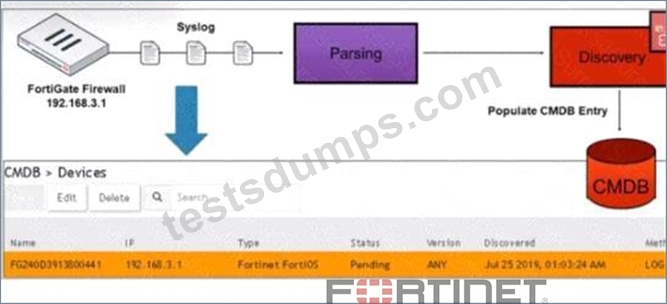
How was the FortiGate device discovered by FortiSIEM?
- A. Pull events discovery
- B. Auto log discovery
- C. GUI log discovery
- D. Syslog discovery
Answer: B
Explanation:
Discovery Methods in FortiSIEM: FortiSIEM can discover devices using various methods, including syslog, SNMP, and others.
Syslog Discovery: The exhibit shows that the FortiGate device is discovered by FortiSIEM using syslog.
* Syslog Parsing: The syslog messages sent by the FortiGate device are parsed by FortiSIEM to extract relevant information.
* CMDB Entry: Based on the parsed information, an entry is populated in the Configuration Management Database (CMDB) for the device.
Evidence in Exhibit: The exhibit shows the syslog flow from the FortiGate Firewall to the parsing and discovery process, resulting in the device being listed in the CMDB with the status "Pending." References: FortiSIEM 6.3 User Guide, Device Discovery section, which explains how syslog discovery works and how devices are added to the CMDB based on syslog data.
NEW QUESTION # 24
Refer to the exhibit.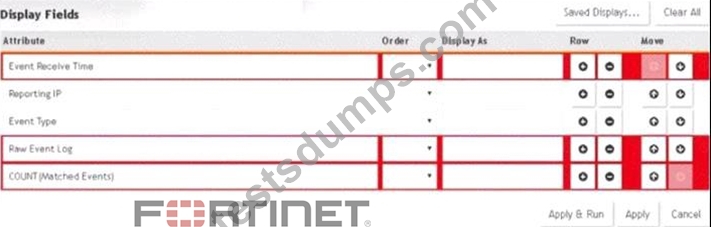
A FortiSIEM administrator wants to group some attributes for a report, but is not able to do so successfully.
As shown in the exhibit, why are some of the fields highlighted in red?
- A. The Event Receive Time attribute is not available for logs.
- B. The attribute COUNT(Matched events) is an invalid expression.
- C. Unique attributes cannot be grouped.
- D. No RAW Event Log attribute is available for devices.
Answer: C
Explanation:
Grouping Attributes in Reports: When creating reports in FortiSIEM, certain attributes can be grouped to summarize and organize the data.
Unique Attributes: Attributes that are unique for each event cannot be grouped because they do not provide a meaningful aggregation or summary.
Red Highlighting Explanation: The red highlighting in the exhibit indicates attributes that cannot be grouped together due to their unique nature. These unique attributes includeEvent Receive Time,Reporting IP, Event Type,Raw Event Log, andCOUNT(Matched Events).
Attribute Characteristics:
* Event Receive Timeis unique for each event.
* Reporting IPandEvent Typecan vary greatly, making grouping them impractical in this context.
* Raw Event Logrepresents the unprocessed log data, which is also unique.
* COUNT(Matched Events)is a calculated field, not suitable for grouping.
References: FortiSIEM 6.3 User Guide, Reporting section, explains the constraints on grouping attributes in reports.
NEW QUESTION # 25
Which three ports can be used to send Syslogs to FortiSIEM? (Choose three.)
- A. UDP 9999
- B. TCP 514
- C. UDP 162
- D. UDP 514
- E. TCP 1470
Answer: B,D,E
NEW QUESTION # 26
What operating system is FortiSIEM based on?
- A. Microsoft Windows
- B. Cent OS
- C. RedHat
- D. Ubuntu
Answer: B
NEW QUESTION # 27
Which command displays the Linux agent status?
- A. Service Aa-linux-agent status
- B. Service fsm-linux-agent status
- C. Service fortisiem-linux-agent status
- D. Service linux-agent status
Answer: C
NEW QUESTION # 28
An administrator is in the process ofrenewing a FortiSIEM license. Which two commands will provide thesystem ID? (Choose two.)
- A. phgetHWID
- B. ./phLicenseTool - support
- C. phgetUUID
- D. ./phLicenseTool-show
Answer: A,C
Explanation:
License Renewal Process: When renewing a FortiSIEM license, it is essential to provide the system ID, which uniquely identifies the FortiSIEM instance.
Commands to Retrieve System ID:
* phgetHWID: This command retrieves the hardware ID of the FortiSIEM appliance.
* Usage: Run the commandphgetHWIDin the CLI to obtain the hardware ID.
* phgetUUID: This command retrieves the universally unique identifier (UUID) for the FortiSIEM system.
* Usage: Run the commandphgetUUIDin the CLI to obtain the UUID.
Verification: BothphgetHWIDandphgetUUIDare valid commands for retrieving the necessary system IDs required for license renewal.
References: FortiSIEM 6.3 Administration Guide, Licensing section details the commands and procedures for obtaining system identification information necessary for license renewal.
NEW QUESTION # 29
A FortiSIEM is continuously receiving syslog events from a FortiGate firewall. The FortiSIEM administrator is trying to search the raw event logs for the last two hours that contain the keyword tcp . However, the administrator is getting no results from the search.
Based on the selected filters shown in the exhibit, why are there no search results?
- A. The administrator selected - in the Operator column That a the wrong operator.
- B. The administrator selected AND in the Next drop-down list. This is the wrong boolean operator.
- C. The keyword is case sensitive Instead of typing TCP in the Value field. the administrator should type tcp.
- D. In the Time section, the administrator selected the Relative Last option, and in the drop-dawn lists, selected 2 and Hours as the time period. The time period should be 24 hours.
Answer: A
NEW QUESTION # 30
Which two FortiSIEM components work together to provide real-time event correlation?
- A. Supervisor and worker
- B. Collector and Windows agent
- C. Supervisor and collector
- D. Worker and collector
Answer: D
Explanation:
FortiSIEM Architecture: The FortiSIEM architecture includes several components such as Supervisors, Workers, Collectors, and Agents, each playing a distinct role in the SIEM ecosystem.
Real-Time Event Correlation: Real-time event correlation is a critical function that involves analyzing and correlating incoming events to detect patterns indicative of security incidents or operational issues.
Role of Supervisor and Worker:
* Supervisor: The Supervisor oversees the entire FortiSIEM system, coordinating the processing and analysis of events.
* Worker: Workers are responsible for processing and correlating the events received from Collectors and Agents.
Collaboration for Correlation: Together, the Supervisor and Worker components perform real-time event correlation by distributing the load and ensuring efficient processing of events to identify incidents in real- time.
References: FortiSIEM 6.3 User Guide, Event Correlation and Processing section, details how the Supervisor and Worker components collaborate for real-time event correlation.
NEW QUESTION # 31
How is a subpattern for a rule defined?
- A. Filters, Aggregation, Group by definitions
- B. Filters, Aggregation, Time Window definitions
- C. Filters, Threshold, Time Window definitions
- D. Filters, Group By definitions, Threshold
Answer: C
NEW QUESTION # 32
Which FortiSIEM components are capable of performing device discovery?
- A. FortiSIEM Windows agent
- B. Worker
- C. FortiSIEM Linux agent
- D. Collector
Answer: D
Explanation:
Device Discovery in FortiSIEM: Device discovery is the process by which FortiSIEM identifies and adds devices to its management scope.
Role of Collectors: Collectors are responsible for gathering data from network devices, including discovering new devices in the network.
* Functionality: Collectors use protocols such as SNMP, WMI, and others to discover devices and gather their details.
Capability: While agents (Windows and Linux) primarily gather data from their host systems, the collectors actively discover devices across the network.
References: FortiSIEM 6.3 User Guide, Device Discovery section, which details the role of collectors in discovering network devices.
NEW QUESTION # 33
......
Regular Free Updates NSE5_FSM-6.3 Dumps Real Exam Questions Test Engine: https://www.testsdumps.com/NSE5_FSM-6.3_real-exam-dumps.html
Tested & Approved NSE5_FSM-6.3 Study Materials Download: https://drive.google.com/open?id=1ENrcIG7EpmRXak91unj4QB4KGA_J23tT
