

[Sep-2023] Download Real MD-102 Exam Dumps for candidates. 100% Free Dump Files
Prepare Important Exam with MD-102 Exam Dumps(2023)
Microsoft MD-102 Exam Syllabus Topics:
| Topic | Details |
|---|---|
| Topic 1 |
|
| Topic 2 |
|
| Topic 3 |
|
| Topic 4 |
|
| Topic 5 |
|
| Topic 6 |
|
| Topic 7 |
|
| Topic 8 |
|
| Topic 9 |
|
| Topic 10 |
|
| Topic 11 |
|
| Topic 12 |
|
| Topic 13 |
|
NEW QUESTION # 59
You have a Microsoft 365 subscription that uses Microsoft Intune Suite. You use Microsoft Intune to manage devices.
You need to review the startup times and restart frequencies of the devices. What should you use?
- A. Microsoft Defender for Endpoint
- B. intune Data Warehouse
- C. Azure Monitor
- D. Endpoint analytics
Answer: D
Explanation:
Explanation
Endpoint analytics is a feature of Microsoft Intune that provides insights into the performance and health of devices. You can use endpoint analytics to review the startup times and restart frequencies of the devices, as well as other metrics such as sign-in times, battery life, app reliability, and software inventory. References:
https://docs.microsoft.com/en-us/mem/analytics/overview
NEW QUESTION # 60
You have a Microsoft 365 subscription that contains the devices shown in the following table.
You plan to enroll the devices in Microsoft Intune.
How often will the compliance policy check-ins run after each device is enrolled in Intune? To answer, select the appropriate options in the answer area.
NOTE: Each correct selection is worth one point.
Answer:
Explanation:
Explanation
Box 1: Every three minutes for 15 minutes, then every 15 minutes for two hours, and then around every eight hours If devices recently enroll, then the compliance, non-compliance, and configuration check-in runs more frequently. The check-ins are estimated at:
Windows 10: Every 3 minutes for 15 minutes, then every 15 minutes for 2 hours, and then around every 8 hours Graphical user interface, text, application, email Description automatically generated
Box 2: Every 15 minutes for one hour, and then every eight hours
iOS/iPadOS: Every 15 minutes for 1 hour, and then around every 8 hours
Reference: https://docs.microsoft.com/en-us/mem/intune/configuration/device-profile-troubleshoot
NEW QUESTION # 61
You need to ensure that computer objects can be created as part of the Windows Autopilot deployment. The solution must meet the technical requirements.
To what should you grant the right to create the computer objects?
- A. Server2
- B. DC1
- C. Server1
- D. GroupA
Answer: C
Explanation:
Reference:
https://blog.matrixpost.net/set-up-windows-autopilot-production-environment-part-2/
NEW QUESTION # 62
You have a Microsoft 365 E5 subscription that uses Microsoft Intune. You have the Windows 11 devices shown in the following table.
You deploy the device compliance policy shown in the exhibit. (Click the Exhibit tab.)
For each of the following statements, select Yes if the statement is true. Otherwise, select No.
NOTE: Each correct selection is worth one point.
Answer:
Explanation:
Explanation
NEW QUESTION # 63
You have a Microsoft 365 E5 subscription.
You need to download a report that lists all the devices that are NOT enrolled in Microsoft Intune and are assigned an app protection policy.
What should you select in the Microsoft Endpoint Manager admin center?
- A. Apps. and then App protection policies
- B. Apps. and then Monitor
- C. Reports, and the Device compliance
- D. Devices, and then Monitor
Answer: A
Explanation:
Explanation
App report: You can search by platform and app, and then this report will provide two different app protection statuses that you can select before generating the report. The statuses can be Protected or Unprotected.
Reference:
https://docs.microsoft.com/en-us/mem/intune/apps/app-protection-policies-monitor
NEW QUESTION # 64
You have a server named Server1 and computers that run Windows 8.1. Server1 has the Microsoft Deployment Toolkit (MDT) installed.
You plan to upgrade the Windows 8.1 computers to Windows 10 by using the MDT deployment wizard.
You need to create a deployment share on Server1.
What should you do on Server1, and what are the minimum components you should add to the MDT deployment share? To answer, select the appropriate options in the answer area.
NOTE: Each correct selection is worth one point.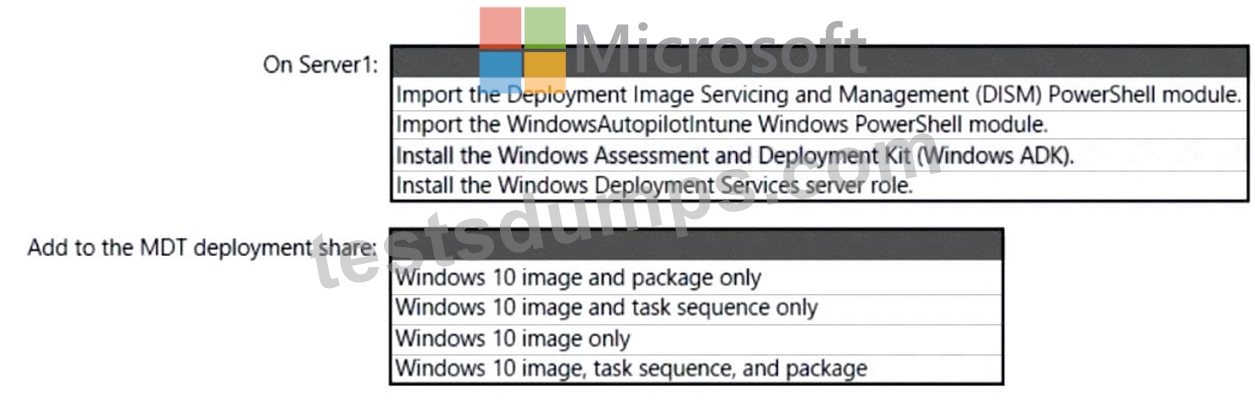
Answer:
Explanation:
Explanation
Box 1: Install the Windows Deployment Services role.
Install and initialize Windows Deployment Services (WDS)
On the server:
Open an elevated Windows PowerShell prompt and enter the following command:
Install-WindowsFeature -Name WDS -IncludeManagementTools
WDSUTIL /Verbose /Progress /Initialize-Server /Server:MDT01 /RemInst:"D:\RemoteInstall" WDSUTIL /Set-Server /AnswerClients:All Box 2: Windows 10 image and task sequence only Create the reference image task sequence In order to build and capture your Windows 10 reference image for deployment using MDT, you will create a task sequence.
Reference:
https://docs.microsoft.com/en-us/windows/deployment/deploy-windows-mdt/prepare-for-windows-deployment-w
https://docs.microsoft.com/en-us/windows/deployment/deploy-windows-mdt/create-a-windows-10-reference-ima
NEW QUESTION # 65
You need to meet the OOBE requirements for Windows AutoPilot.
Which two settings should you configure from the Azure Active Directory blade? To answer, select the appropriate settings in the answer area.
NOTE: Each correct selection is worth one point.
Answer:
Explanation:
Explanation
Reference:
https://blogs.msdn.microsoft.com/sgern/2018/10/11/intune-intune-and-autopilot-part-3-preparing-your-environm
https://blogs.msdn.microsoft.com/sgern/2018/11/27/intune-intune-and-autopilot-part-4-enroll-your-first-device/
NEW QUESTION # 66
You have a Windows 11 capable device named Device1 that runs the 64-bit version of Windows 10 Enterprise and has Microsoft Office 2019 installed. You have the Windows 11 Enterprise images shown in the following table.
Which images can be used to perform an in-place upgrade of Device1?
- A. lmage2only
- B. image1 only
- C. Image1 and Image2
Answer: A
NEW QUESTION # 67
You have an on-premises server named Server! that hosts a Microsoft Deployment Toolkit (MDT) deployment share named MDT1. You need to ensure that MDT1 supports multicast deployments. What should you install on Server1?
- A. Multipath I/O (MPIO)
- B. Multipoint Connector
- C. Windows Deployment Services (WDS)
- D. Windows Server Update Services (WSUS)
Answer: C
NEW QUESTION # 68
You have a Microsoft 365 E5 subscription that contains 100 iOS devices enrolled in Microsoft Intune.
You need to deploy a custom line-of-business (LOB) app to the devices by using Intune.
Which extension should you select for the app package file?
- A. .appx
- B. jpa
- C. apk
- D. .intunemac
Answer: B
Explanation:
Explanation
iOS/iPadOS LOB apps: Select Line-of-business app as the app type, select the App package file, and then enter an iOS/iPadOS installation file with the extension .ipa.
Reference:
https://docs.microsoft.com/en-us/mem/intune/apps/apps-add
NEW QUESTION # 69
You have an Azure AD tenant named contoso.com that contains the devices shown in the following table.
AH devices contain an app named App1 and are enrolled in Microsoft Intune.
You need to prevent users from copying data from App1 and pasting the data into other apps.
Which type of policy and how many policies should you create in Intune? To answer, select the appropriate options in the answer area.
NOTE: Each correct selection is worth one point.
Answer:
Explanation:
Explanation
Policy type: App protection policy Minimum number of policies: 1 Comprehensive Explanation of Correct Answer Only: The correct answer is app protection policy because it allows you to customize the settings of apps for iOS/iPadOS or Android devices . One of the settings you can configure is Restrict cut, copy, and paste between other apps, which lets you prevent users from copying data from App1 and pasting the data into other apps2. You only need one policy to apply this setting to all devices that have App1 installed1.
References: 1: App configuration policies for Microsoft Intune | Microsoft Learn
https://learn.microsoft.com/en-us/mem/intune/apps/app-configuration-policies-overview 2: Troubleshoot restricting cut, copy, and paste between applications - Intune | Microsoft Learn
https://learn.microsoft.com/en-us/troubleshoot/mem/intune/app-protection-policies/troubleshoot-cut-copy-paste
NEW QUESTION # 70
You have 100 computers that run Windows 10 and connect to an Azure Log Analytics workspace.
Which three types of data can you collect from the computers by using Log Analytics? Each correct answer a complete solution.
NOTE: Each correct selection is worth one point.
- A. the average processor utilization
- B. third-party application logs stored as text files
- C. error events from the System log
- D. failure events from the Security log
- E. the list of processes and their execution times
Answer: A,B,C
Explanation:
Explanation
You can collect error events from the System log, third-party application logs stored as text files, and the average processor utilization from the computers by using Log Analytics. These are some of the types of data that you can collect by using data sources such as Windows event logs, custom logs, and performance counters. You cannot collect failure events from the Security log or the list of processes and their execution times by using Log Analytics. References:
https://docs.microsoft.com/en-us/azure/azure-monitor/agents/data-sources-overview
NEW QUESTION # 71
Your company standardizes on Windows 10 Enterprise for all users.
Some users purchase their own computer from a retail store. The computers run Windows 10 Pro.
You need to recommend a solution to upgrade the computers to Windows 10 Enterprise, join the computers to Azure AD, and install several Microsoft Store apps. The solution must meet the following requirements:
* Ensure that any applications installed by the users are retained.
* Minimize user intervention.
What is the best recommendation to achieve the goal?
More than one answer choice may achieve the goal.
Select the BEST answer.
- A. a Windows Configuration Designer provisioning package
- B. Windows Autopilot
- C. Windows Deployment Services (WDS)
- D. Microsoft Deployment Toolkit (MDT)
Answer: B
NEW QUESTION # 72
You have a Microsoft 365 tenant and an internal certification authority (CA).
You need to use Microsoft Intune to deploy the root CA certificate to managed devices.
Which type of Intune policy and profile should you use? To answer, select the appropriate options in the answer area.
NOTE: Each correct selection is worth one point.
Answer:
Explanation:
Explanation
Box 1: Configuration profile
Create a trusted certificate profile.
Box 2: Trusted certificate
When using Intune to provision devices with certificates to access your corporate resources and network, use a trusted certificate profile to deploy the trusted root certificate to those devices. Trusted root certificates establish a trust from the device to your root or intermediate (issuing) CA from which the other certificates are issued.
Reference: https://docs.microsoft.com/en-us/mem/intune/protect/certificates-trusted-root
NEW QUESTION # 73
You have a Microsoft 365 subscription.
You use Microsoft Intune Suite to manage devices.
You have the iOS app protection policy shown in the following exhibit.
Use the drop-down menus to select the answer choice that completes each statement based on the information presented in the graphic. NOTE: Each correct selection is worth one point,
Answer:
Explanation: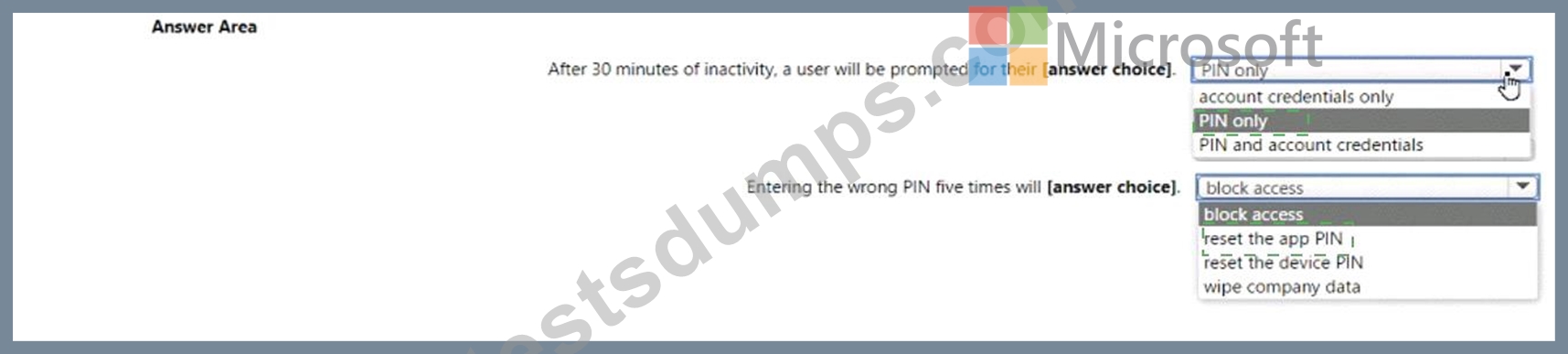
Explanation
Box 1 = PIN only
Box 2 = reset the PIN app
iOS/iPadOS app protection policy settings - Microsoft Intune | Microsoft Learn
https://learn.microsoft.com/en-us/mem/intune/apps/app-protection-policy-settings-ios
NEW QUESTION # 74
......
MD-102 Questions - Truly Beneficial For Your Microsoft Exam: https://www.testsdumps.com/MD-102_real-exam-dumps.html
Pass Exam Questions Efficiently With MD-102 Questions: https://drive.google.com/open?id=1adzNCQS-iWvY8CUvrXQ8y2GvNrNM_nEt
